
Job Maven Recommendations (JMR) on Agent.ai
Copy this template to easily build your maven list in Google Sheets:
IMPORTANT: You must set your Google Sheet to "Published on the Web."
Sharing your Google Sheet to "Anyone with Link" will not suffice. Agent.ai needs to scrape a fully published web page.
Learn how to "Publish Google Sheet to Web." (It's easy- two clicks).
Google Sheet Alternatives:
The JMR agent scrapes whatever web page you assign it to scrape.
As long as your maven list is scrapeable and is displayed in this template format, use any tool that hosts a public web page should work.
While I have not tested JMR with these tools, they should work:
- Airtable
- WordPress
- Squarespace
- Wix
- Microsoft Excel (save as a Web Page)
- Notion page (but not a table or database)
If you encounter issues, contact me and I'll try to help.
How to Auto Schedule Ongoing Alerts:
MJR can run automatically- but only if you actively enable auto-scheduled runs. Here's how.
When you run MJR for the first time, the agent will finish and present options that are very easy to miss.
To set your alert schedule, look for these buttons at the bottom:

Click on "Auto Schedule" to open these settings:
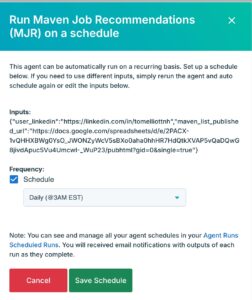
And choose your schedule.
We recommend a daily run, but the frequency is yours, Kenneth.
Contact me for help!